1 user · 1 Windows PC
Try SendFlow on a single workstation while we polish the Free experience for SMEs.

SendFlow is a Sunflower Technology product that turns any Windows print job into a WhatsApp PDF delivery — so teams stop saving files, hunting folders, and attaching documents by hand.
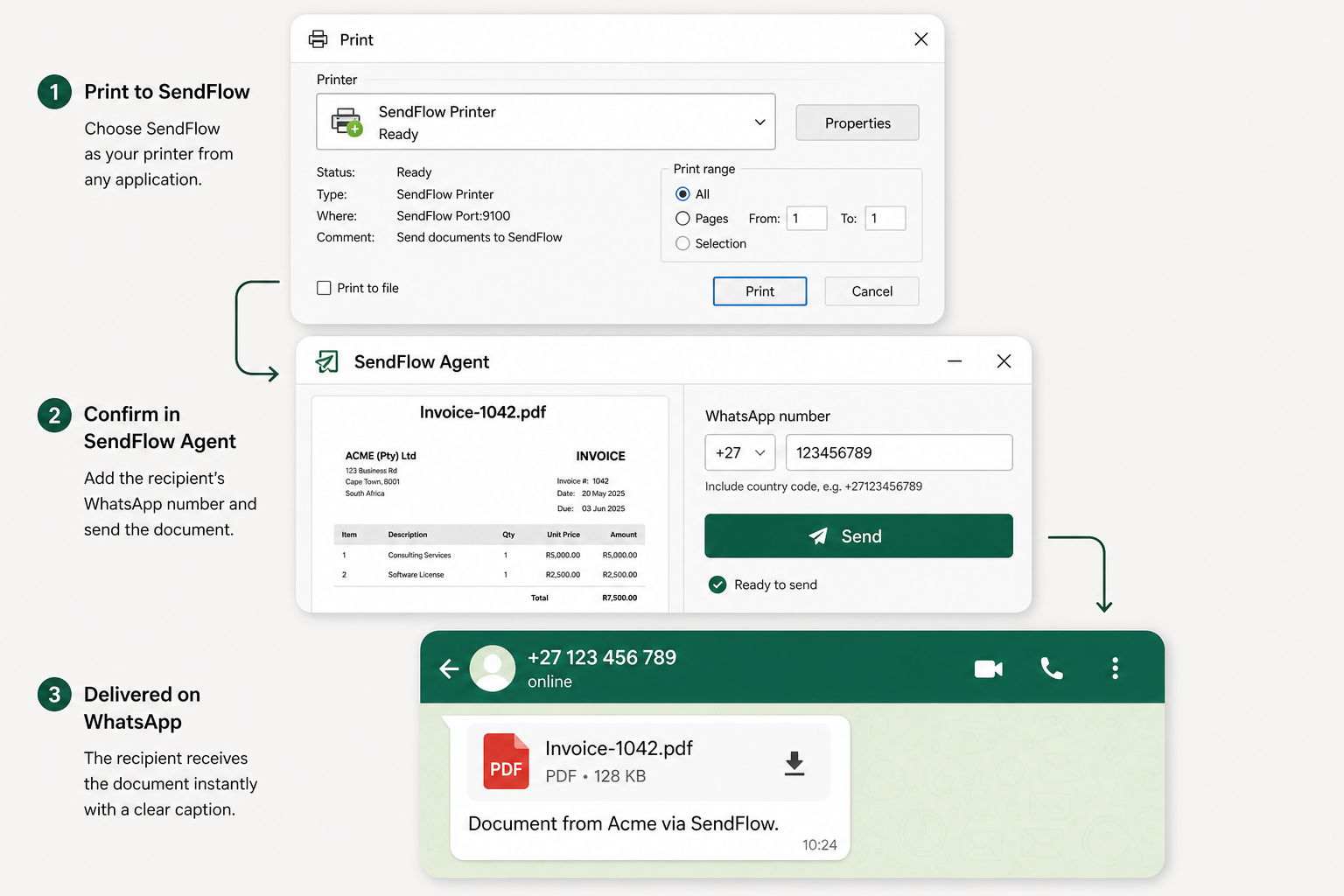
SendFlow installs as a Windows virtual printer. Print from Word, Excel, a browser, accounting software, or a legacy app, confirm the WhatsApp recipient, and SendFlow delivers the PDF as a WhatsApp document.
During Free Early Access, delivery uses a shared SendFlow WhatsApp number. Every message identifies the sender and includes a report-abuse link. Temporary document copies are deleted after delivery or within 24 hours.
Choose SendFlow from the normal Windows Print menu in any printable application.
Preview the PDF, pick a saved contact or enter a WhatsApp number, then send.
The PDF arrives as a WhatsApp document. Failures produce an email alert (NDR).
Try SendFlow on a single workstation while we polish the Free experience for SMEs.
Fair-use daily limit for Early Access. No credit card required.
Outbound WhatsApp uses a shared SendFlow sender. Sender identity and abuse reporting are included on every delivery.
EU-hosted processing, TLS in transit, pipeline-only storage, and automatic deletion after terminal status or within 24 hours.